
Preparing legal documents often involves more than reviewing evidence and compiling material. Before documents are shared with clients, counsel, courts or other parties, sensitive information must be identified and removed accurately.
To help simplify this process, Legal Ready is pleased to introduce Document Redaction, a new capability being rolled out across Legal Ready’s suite of products.
Secure document preparation, built into your workflow
Document Redaction enables legal professionals to permanently remove confidential information from PDF documents without relying on separate software or disconnected processes.
By integrating redaction into existing workflows, legal teams can prepare documents more efficiently while reducing administrative overhead and maintaining confidence that sensitive information has been securely removed before documents are shared.
Key benefits
Permanently protect sensitive information
Securely redact confidential, privileged or personal information before documents are provided to clients, counsel, courts or other parties.
Reduce manual processes
Complete document preparation and redaction within the same workflow, helping minimise unnecessary file transfers and repetitive tasks.
Improve efficiency
Spend less time moving between multiple applications and more time progressing matters.
Work with greater confidence
Whether preparing disclosure material, court documents or evidence, Document Redaction helps legal professionals confidently manage sensitive information before documents leave their control.
How it works
- A dedicated “Redaction” tab has been added alongside search and annotation tools. It will list all existing redactions within a document.
- The tool offers two primary methods for redaction:
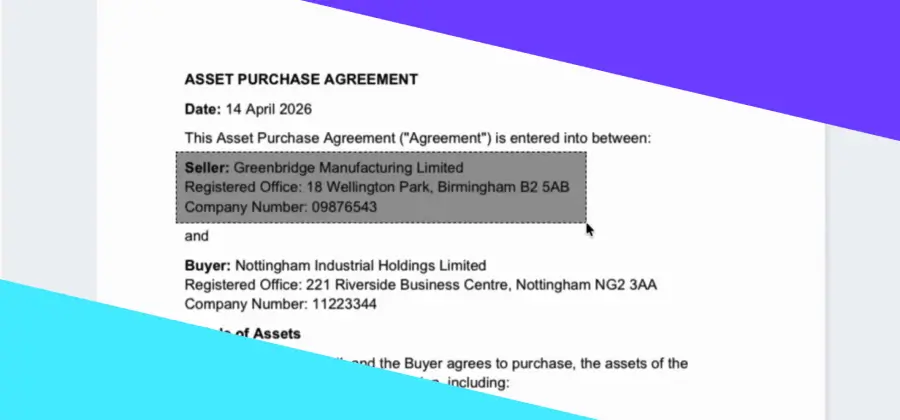
- Block Redaction – allows users to mark rectangular areas for redaction.
- Text Redaction – enables precise selection and redaction of specific text.
- Redactions are marked within the system, however the original content remains visible to the user. This allows for thorough review and verification of redaction placement without obscuring information needed for internal review processes.
- Redactions are only applied permanently as black boxes when the document is exported (e.g., when creating a bundle or brief). The content within the redacted areas is completely removed from the final PDF output.
Continuing to evolve the Legal Ready product suite
Document Redaction is the latest example of Legal Ready’s ongoing investment in technology that helps legal professionals work more efficiently throughout the lifecycle of a matter.
As the Legal Ready product suite continues to evolve, new capabilities are being introduced to help reduce administrative effort, improve collaboration and support more efficient document management across legal practices.
To learn more about Document Redaction, please visit your relevant product knowledge base or contact our Support team.